
Age-Based Consent
This page provides context on how to implement an age-based consent solution for the OneTrust Android/Android TV SDK.
1. Overview
Age-Based Consent (also called "Age Gate") enables automatic consent enforcement based on a user's age range. Administrators configure age range groups (e.g., 0-13, 14-17, 18+) in the OneTrust admin console and link them to specific purposes or purpose groups. When a user falls within a restricted age range, consent for the linked purposes is automatically denied and the user cannot override this restriction.
How It Works
- Admin configures restricted age range groups in the OneTrust admin console and links purposes/purpose groups to them.
- Your application provides the user's age range to the SDK via a delegate/callback.
- The SDK sends the age range to the CMP API, which evaluates it against the configured restrictions.
- The SDK reflects the restrictions in the consent UI (Preference Center) and public APIs.
Key Concepts
| Concept | Description |
|---|---|
| Age Range | A lower and upper bound representing the user's age (e.g., 13-17). Both bounds are optional. To represent "18+" (adults), set lowerBound = 18 and leave upperBound nil. The SDK validates that at least one bound is provided before sending to the server. |
| Restricted Age Group | An age range configured in the admin console and linked to one or more purposes. Users whose age range overlaps are restricted. |
| Restricted Purpose | A purpose linked to an age group. When the user is restricted, consent is denied and the toggle is disabled. |
AGEGATE_RANGE | The CMP API interaction type used to log and enforce age-based consent restrictions. |
What Age-Based Consent Does NOT Do
- It does not determine the user's age. Your application must provide this data.
- It does not use platform-level APIs (e.g., Apple's
DeclaredAgeRange, AndroidAccountManager) as a source. - It does not change the existing Age Gate prompt UI or
getAgeGatePromptValue()API -- these are independent features (see Appendix).
Supported SDKs
The implementation pattern is the same across all OneTrust SDKs. The delegate/callback name and language syntax differ, but the feature behavior is identical:
| SDK | Language | Delegate/Callback |
|---|---|---|
| Apple (iOS/tvOS) | Swift / Objective-C | CustomConfigurator.getProfileAgeRange(for:completion:) |
| Android | Kotlin / Java | OTCustomConfigurator.getProfileAgeRange(profileID, callback) |
| MAUI | C# | Equivalent CustomConfigurator implementation |
| Unity | C# | Equivalent CustomConfigurator implementation |
| CTV (HTML5) | JavaScript | Equivalent configurator callback |
| Roku | BrightScript | Equivalent configurator callback |
| Hybrid (React Native, Flutter, Cordova) | Bridge to native | Wraps the native SDK's CustomConfigurator |
Note: This guide uses Apple (Swift) and Android (Kotlin) code snippets as examples. The concepts apply identically to all SDKs listed above.
2. Prerequisites
Before implementing Age-Based Consent, ensure:
Admin Console Configuration
- Age range groups are configured in the OneTrust admin console (under the Age Gate section).
- Purpose groups/categories are linked to the appropriate age range groups.
- The Age Gate feature flag is enabled for your organization.
SDK Version
- Apple (iOS/tvOS): 202608.1.0 or later (Phase 2 enhancements require 202610.1.0+).
- Android: equivalent version supporting Age Gate.
- Other SDKs: check the respective changelog for Age Gate support.
CMP API Flow
- Your application must be using the CMP API flow (not the legacy mobile-data flow).
- Age-Based Consent is not supported in the legacy flow.
Age Gate Prompt is NOT Required
- Age range enforcement works independently of the Age Gate prompt. You do not need to enable the prompt UI to use age range-based enforcement.
- If you already have an age signal from your application (e.g., from user registration or login), you can use it directly.
3. Implementation
Step 1: Define Your Age Range Provider
Implement the age range delegate/callback in your application. The SDK calls this method automatically during initialization (startSDK) and whenever checkAndLogConsent is invoked for the .ageGate permission type.
Android (Kotlin)
import com.onetrust.otpublishers.headless.Public.OTCustomConfigurator
import com.onetrust.otpublishers.headless.Public.ProfileAgeRange
class MyAppConfigurator : OTCustomConfigurator() {
    override fun getProfileAgeRange(
        profileID: String,
        callback: (ProfileAgeRange?) -> Unit
    ) {
        // Retrieve the user's age range from your application's user profile system.
        val user = UserService.getUser(profileID)
        if (user == null) {
            callback(null)  // Age unknown
            return
        }
        when (user.ageCategory) {
            AgeCategory.CHILD -> callback(ProfileAgeRange(lowerBound = 0, upperBound = 12))
            AgeCategory.TEEN  -> callback(ProfileAgeRange(lowerBound = 13, upperBound = 17))
            AgeCategory.ADULT -> callback(ProfileAgeRange(lowerBound = 18, upperBound = null))
            else              -> callback(null)
        }
    }
}
Important: The
profileIDparameter identifies the current user/profile session. Your implementation should return the age range specific to that user. This is especially important in multi-profile or account-switching scenarios.
Step 2: Register the Provider
Register your age range provider before calling startSDK.
val configurator = MyAppConfigurator()
OTPublishersHeadlessSDK.instance.setCustomConfigurator(configurator)
OTPublishersHeadlessSDK.instance.startSDK(
    storageLocation = "cdn.cookielaw.org",
    domainIdentifier = "YOUR-DOMAIN-ID",
    languageCode = "en",
    params = OTSdkParams.SdkParamsBuilder.newInstance().build()
) { response ->
    // SDK is ready. Age Gate restrictions are already applied.
}
Note:
getProfileAgeRangeis part of theCustomConfiguratorprotocol/class, which also handles proxy URLs. If you are already usingCustomConfigurator, simply add thegetProfileAgeRangemethod to your existing implementation.
Step 3: Handle Age Range Changes at Runtime
If the user's age range can change after SDK initialization (e.g., profile update, account switch, login), call checkAndLogConsent to re-evaluate and log the change.
// Call this after the user's age range may have changed
OTPublishersHeadlessSDK.instance.checkAndLogConsent(
    AppPermissionType.AGE_GATE
) { success ->
    if (success) {
        // Age range was updated and logged successfully
    } else {
        // No change detected, or the update failed
    }
}
When to call checkAndLogConsent:
| Scenario | Action |
|---|---|
| User updates their profile (age or date of birth changes) | Call checkAndLogConsent |
| User switches accounts | Call checkAndLogConsent |
| User logs in or re-authenticates | Call checkAndLogConsent |
| App launch / SDK initialization | Not needed -- the SDK does this automatically |
4. SDK Lifecycle and Behavior
What Happens During startSDK
startSDKWhen the SDK initializes:
- It calls your
getProfileAgeRangedelegate to retrieve the user's age range. - If a valid age range is returned and it differs from the previously stored value:
- The SDK sends the age range to the CMP API server via a
save-log-consentcall with theAGEGATE_RANGEinteraction type. - The server evaluates the age range against the configured age groups and returns updated consent data.
- On success, the SDK stores the server-confirmed age range locally and enforces restrictions.
- The SDK sends the age range to the CMP API server via a
- If the delegate returns
nil:- The SDK does not send an age range to the server.
- If the server already has an age range for this profile (from a prior interaction or another device), it continues to enforce those restrictions via cached data.
- If no age range exists for this profile, no restrictions are applied.
What checkAndLogConsent Does (Same Logic, Called at Runtime)
checkAndLogConsent Does (Same Logic, Called at Runtime)- Calls your
getProfileAgeRangedelegate to get the latest age range. - Compares it against the previously stored age range.
- If changed and a valid age range is provided (not
nil):- Sends the new value to the CMP API with the
AGEGATE_RANGEinteraction type. - If the CMP API call succeeds, stores the server-confirmed age range locally and enforces the updated restrictions.
- If the CMP API call fails, local storage is not updated, and the previously synced age range remains in effect.
- Sends the new value to the CMP API with the
- If unchanged, or if the delegate returns
nil, no action is taken.
Age Range Source of Truth: CMP API, Not the App
The SDK only honors the age range registered with the CMP API. It does not apply the app-provided age range locally until the server has acknowledged it. This is a deliberate design decision:
- If the
AGEGATE_RANGEcall succeeds: The SDK stores the server-confirmed age range locally and enforces the restrictions returned by the server. The locally cached data (consent map, consent strings, UI data) all reflect the server-evaluated state. - If the
AGEGATE_RANGEcall fails (e.g., network error): The SDK does not store or apply the app-provided age range locally. Instead, it continues using whatever age range was last successfully synced with the CMP API (if any). If no age range has ever been synced, no restrictions are applied.
Subsequent CMP API calls (banner, preference center, etc.) also require network connectivity. If the Age Gate call fails due to a network issue, those calls will fail too, since the Age Gate call is the first call during SDK setup. Adding local enforcement for a scenario that also prevents all other SDK operations would add unnecessary complexity.
This behavior follows the same pattern as all other SDK data flows (banner, preference center, etc.): the SDK uses cached server-synced data for processing. The CMP API is the authoritative source for consent state, and the SDK renders its data.
In Practice
An age range registration failure is an extremely rare event. A user's age range typically changes at most once (during profile creation or a birthday update), and for that single call to fail requires a simultaneous network outage. The risk does not justify duplicating the CMP API's enforcement logic in the SDK.
Age Range Persists on the Profile
Once a profile is registered with an age range on the CMP API, that age range stays associated with the profile. Even if the SDK or client subsequently sends nil/null for both lowerBound and upperBound, the CMP API will continue to use the last successfully registered age range for that profile. The only way to remove an age range from a profile is through admin action. This means age-based restrictions, once applied, remain in effect until a new valid age range is provided or the range is cleared server-side.
5. SDK Public APIs Affected by Age Gate
getConsentStatus(forCategory:)
getConsentStatus(forCategory:)Returns the consent status for a purpose group. Returns 0 (denied) for any purpose restricted by Age Gate.
// Android
val status = OTPublishersHeadlessSDK.instance.getConsentStatusForGroupId("C0005")
// Returns: 1 = given, 0 = denied (including age-restricted), -1 = invalid group ID
getPurposeConsentLocal(forCustomGroupId:)
getPurposeConsentLocal(forCustomGroupId:)Returns the most up-to-date consent value on the device. Returns 0 (denied) for age-restricted purposes. This API includes a local age gate check and will return 0 even if the underlying stored consent value differs.
//Android
val status = OTPublishersHeadlessSDK(context).getPurposeConsentLocal("C0005")
updatePurposeConsent(forGroup:consentValue:)
updatePurposeConsent(forGroup:consentValue:)Updates consent programmatically. For age-restricted purposes, the SDK silently blocks any attempt to set consent to true (via canToggleConsentStatus(), which checks age gate authorization).
// Android
OTPublishersHeadlessSDK.instance.updatePurposeConsent("C0005", true)
// If C0005 is age-restricted, this call is silently ignored.
Summary
- getConsentStatus: Normal purpose returns user's consent (0 or 1). Age gate restricted purpose returns 0 (denied).
- getPurposeConsentLocal: Normal purpose returns local consent value. Age gate restricted purpose returns 0 (denied).
- updatePurposeConsent(true): Normal purpose updates consent to given. Age gate restricted purpose is silently ignored, and consent remains denied.
- updatePurposeConsent(false): Normal purpose updates consent to denied. Age gate restricted purpose is a no-op (already denied).
getAgeGatePromptValue()
getAgeGatePromptValue()This API returns the user's interaction state with the existing Age Gate prompt UI. It is completely independent of age range-based enforcement and is not affected by Age-Based Consent.
//Android
val value = OTPublishersHeadlessSDK(context).getAgeGatePromptValue()
// Returns: 1 = accepted, 0 = denied, -1 = not interacted
6. Preference Center Behavior
When a user's age range overlaps with a restricted age group:
- Purpose visibility: The purpose remains visible in the Preference Center.
- Consent toggle: Shown in a disabled (grayed-out) state, set to OFF.
- Explanatory copy: Displayed below the toggle in purpose details: "This item isn't available for your age range and cannot be enabled."
- User interaction: The toggle cannot be changed through touch, keyboard, remote, or accessibility.
- Consent value: Automatically set to 0 (denied).
- Legitimate Interest: If linked, the LI toggle is also disabled when restricted by Age Gate.
- Always Active purposes: Purposes configured as "Always Active" (
consentToggleStatus == 2) are never restricted by Age Gate, even if linked to a restricted age group.
When the user is NOT restricted:
- Purpose visibility: Normal.
- Consent toggle: Normal, visible and interactive.
- Consent value: Based on user's actual choice.
Note (Phase 2 Change): In earlier versions (Phase 1), restricted purpose toggles were completely hidden from the UI. Starting with Phase 2 (SDK 202610.1.0+), restricted toggles are shown in a disabled state instead. This provides better transparency to users and aligns the preference center with privacy disclosures.
Accept All / Reject All
Accept All and Reject All operate on purposes that are available to the user. Age Gate restricted purposes remain denied regardless of Accept All/Reject All actions.
7. Consent String Handling
-
When Age Gate restrictions are applied, the CMP API correctly recomputes all applicable consent strings:
- TC String (TCF): Re-encoded with restricted purposes reflected as denied
- GPP String: Re-encoded based on the final consent state with restrictions applied
- US Privacy String: Generated based on the current consent state with restrictions applied
- Google Additional Consent: Re-encoded appropriately
Why "not applicable" instead of "opted out"? Because the user never saw or acted on the restricted purpose. From a privacy string perspective, the user did not make a choice -- the purpose was unavailable. This is semantically different from the user explicitly opting out.
Data Model Reference
ProfileAgeRange
Represents the user's age range. This is the type your getProfileAgeRange delegate returns.
Properties
| Name | Type | Required | Description |
|---|---|---|---|
| lowerBound | Integer, 0-255 | Optional | Minimum age in the range. If omitted, treated as 0 (i.e., from birth). |
| upperBound | Integer, 0-255 | Optional | Maximum age in the range. If omitted, treated as open-ended (i.e., no upper limit). |
Constraints
- Both bounds are optional at the data model level.
- The SDK validates that at least one bound is provided before sending to the CMP API. If both are nil, the SDK treats it as "no age range" and does not send an AGEGATE_RANGE request.
- When both are provided, upperBound must be greater than or equal to lowerBound. Equal values (e.g., 18, 18) are valid and represent a single-age range.
- Values are clamped to the 0-255 range (SDK-side).
Valid Examples
| Example | lowerBound | upperBound | Meaning |
|---|---|---|---|
| Child (0-12) | nil or 0 | 12 | Ages 0 through 12. |
| Teen (13-17) | 13 | 17 | Ages 13 through 17. |
| Adult (18+) | 18 | nil | Ages 18 and above (open-ended). |
| Exact range | 25 | 34 | Ages 25 through 34. |
Invalid Examples (silently rejected by the SDK)
| Example | lowerBound | upperBound | Why invalid |
|---|---|---|---|
| Both nil | nil | nil | At least one bound is required. |
| Equal bounds | 18 | 18 | Valid, since it represents a single-age range. |
| Inverted | 25 | 18 | Lower must be less than upper. |
When an invalid age range is provided, the SDK logs a warning and treats it as if nil was returned. No age range is sent to the server.
Age Range Validation Rules
Both fields are optional at the data model level. The SDK performs the following validation before sending to the CMP API:
| Configuration | Result |
|---|---|
| Both bounds are nil | Treated as "no age range"; SDK does not send AGEGATE_RANGE. |
| Lower > Upper (when both provided) | Rejected; treated as nil. |
| Lower == Upper (e.g., 18, 18) | Valid; represents a single-age range. |
| Only lower bound provided (e.g., 18+) | Valid; upper is open-ended. |
| Only upper bound provided (e.g., 0-12) | Valid; lower defaults to 0. |
| Both bounds valid (lower < upper) | Valid. |
| Values outside 0-255 | Clamped to 0-255. |
Age Range Overlap Logic
A user is considered restricted for a purpose if their age range shares any overlap with one or more restricted age groups linked to that purpose. Partial overlap results in restriction. The overlap evaluation happens server-side (CMP API).
Overlap Formula:
restricted = (user.lowerBound <= group.upperBound) AND (user.upperBound >= group.lowerBound)
Where:
| Term | Definition |
|---|---|
user.lowerBound | Defaults to 0 if not provided. |
user.upperBound | Defaults to unbounded (effectively infinity) if not provided. |
group.lowerBound | Defaults to 0 if not configured. |
group.upperBound | Always configured (required in admin setup). |
Example: Restricted age group 0-15
| User age range | Result | Reason |
|---|---|---|
| [0, 18] | Restricted | Overlap at ages 0-15. |
| [14, 16] | Restricted | Overlap at ages 14-15. |
| [18, 25] | Not restricted | No overlap (18 > 15). |
| [18, nil] | Not restricted | Open-ended 18+ does not intersect 0-15. |
| [nil, 12] | Restricted | 0-12 is fully within 0-15. |
A purpose can be linked to multiple age groups. A user is restricted if their age range overlaps with any of the linked groups.
10. Cross-Device Behavior
For environments with Cross-Device Consent (CRO) or Authenticated Consent enabled, age-based restrictions are enforced server-side and persist across devices.
- A user's age range is logged from any device (via SDK or CMP API).
- The CMP API stores the age range for the user's profile.
- All subsequent consent responses for that profile enforce the same restrictions.
- Enforcement applies across devices, sessions, and SDK versions.
SDK Version Compatibility in Cross-Device Scenarios
| SDK version | Toggle behavior | API enforcement | Server override |
|---|---|---|---|
| Phase 2+ SDK (recommended) | Shown as disabled | updatePurposeConsent blocked | Yes |
| Phase 1 SDK | Hidden | updatePurposeConsent blocked | Yes |
| Older SDK (with CMP API support) | Hidden (via consentToggleStatus: -1) | Not enforced locally | Overrides on next sync |
| Legacy SDK (no CMP API) | May remain visible | Not enforced | Overrides on next sync |
Recommendation: Upgrade all applications to the latest SDK version with Age-Based Consent support for complete enforcement at both the UI and API levels.
11. Anonymous-to-Known User Consent Transfer
When a user transitions from an anonymous session to an authenticated (known) session, the SDK transfers consent using the SYNC_PROFILE interaction. Age-Based Consent adds safeguards to this process.
If the known profile already has an age range:
- Consent for Age Gate-linked purposes is not transferred, regardless of recency.
- The server preserves the existing age-restricted consent state.
- Consent for non-linked purposes transfers normally (latest value wins).
If the known profile does NOT have an age range:
- All consent transfers normally (latest value wins).
- Age-based restrictions are not applied until an age range is provided.
Important: The anonymous user's age range is not carried over to the known profile. Age range is identity-specific. The authenticated profile must provide its own age range via the getProfileAgeRange delegate.
Implementation Guidance
- Implement
getProfileAgeRangefor authenticated users (recommended). - Optionally implement it for anonymous users if age data is collected pre-login.
When a user authenticates:
- The SDK calls
getProfileAgeRangewith the new profile ID. - Your app should return the correct age range for that authenticated user.
What Happens to the Anonymous User's Age Range During SYNC_PROFILE?
SYNC_PROFILE?The anonymous user's age range is intentionally discarded during SYNC_PROFILE. The CMP API explicitly strips the anonymous OT consent string's age gate data before evaluating the sync (setting ageGate: undefined). The known profile's existing age range (if any) is read from the profile's dataElements and re-applied to the returned consent string. This prevents a potentially unverified anonymous age range from being carried over to an authenticated profile.
Example Flow
Anonymous user (DSID: a1b2c3d4-..., age 14-17) provides consent. Age Gate restricts linked purposes.
- User logs in. The SDK renames the DSID to the authenticated profile's DSID (e.g.,
f9e8d7c6-...). - The SDK calls
handleAuthenticatedConsent, which sendsSYNC_PROFILEto the CMP API. - The CMP API evaluates the known profile:
- The anonymous age range (14-17) is discarded. It is not transferred.
- If the known profile has age 14-17 (from a prior registration), restrictions remain, and consent for linked purposes reflects the profile's state.
- If the known profile has age 18-25, there is no restriction, and consent transfers normally.
- If the known profile has no age range, all consent transfers, and restrictions are applied only after age is provided.
- The SDK calls
getProfileAgeRange("f9e8d7c6-..."). Your app maps this DSID to the authenticated user and returns their age range. The SDK then sendsAGEGATE_RANGEto register it.
12. Android and ATT
ATT does not exist on Android. On Android, isConsentDisabled and isLegIntDisabled in the CMP API response are always Age Gate restrictions. The SDK renders them identically to iOS (disabled toggle with hint text).
13. Offline and Failure Behavior
What Happens When the AGEGATE_RANGE Call Fails
AGEGATE_RANGE Call FailsThe SDK follows a fail-open design for Age Gate. If the AGEGATE_RANGE save-log-consent call fails:
| Scenario | Local state | SDK behavior |
|---|---|---|
| First-time user, no prior age range | No age range is stored locally. | Treats the user as unrestricted (no enforcement). |
| Returning user with a previously synced age range | Local storage retains the last successfully synced age range. | Continues enforcing the previously synced restrictions. |
| App passes a new age range, call fails | The new age range is not persisted locally. The previously synced age range is retained. | The previously synced age range remains in effect. |
Why Fail-Open?
The Age Gate call is the first network call during SDK setup. If it fails due to a network issue, all subsequent CMP API calls (banner, preference center) will also fail, and the SDK falls back to cached server data for all rendering. Adding local enforcement for a network-failure scenario that already prevents all other SDK operations would introduce inconsistency between local enforcement and server state without any user-facing benefit.
Key Takeaway
If your application collects age data during registration and the first AGEGATE_RANGE call succeeds, subsequent sessions will always have a cached age range available. The offline/failure scenario mainly affects the gap between when the app first collects an age range and when it is first successfully synced.
14. End-to-End Flow
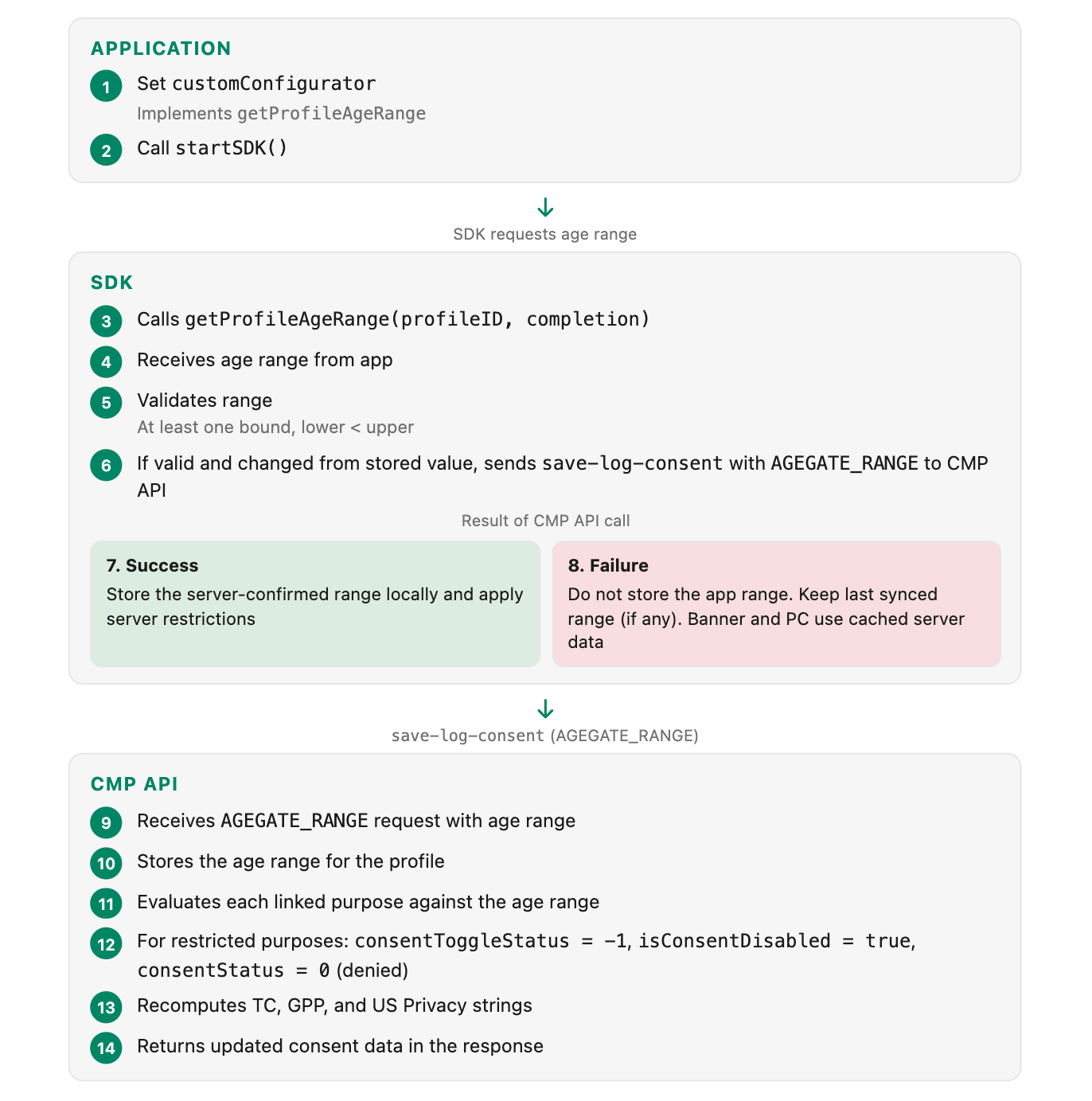
15. Troubleshooting and FAQ
Q: I set an age range, but the purposes are not being restricted.
Check:
- Are age range groups configured and linked to purposes in the admin console?
- Is the Age Gate feature flag enabled for your organization?
- Does the user's age range actually overlap with the configured restricted age groups? (See Overlap Logic)
- Did the
save-log-consentcall succeed? Age range restrictions are only applied after a successful server sync.
Q: The toggle is hidden instead of being shown as disabled.
This is Phase 1 behavior. Ensure you are using SDK version 202610.1.0 or later (Phase 2), which shows restricted toggles in a disabled state instead of hiding them.
Q: I provided an age range but the SDK did not apply it.
The SDK only honors age ranges that have been successfully registered with the CMP API. If the AGEGATE_RANGE network call failed, the SDK does not apply the app-provided range locally. Check your network connectivity and ensure the CMP API endpoint is reachable.
Verify the age range is valid (see Validation Rules). Invalid ranges (both bounds nil, lower >= upper) are silently rejected by the SDK before any network call is made.
Check SDK logs for messages containing "age range" or AGEGATE_RANGE to diagnose the issue.
Q: What happens if the Age Gate call fails (offline/network error)?
The SDK follows a fail-open design. See Offline and Failure Behavior for detailed platform-specific behavior. In summary:
- First-time user with no prior sync: treated as unrestricted.
- Returning user with prior sync: the last successfully synced age range continues to be enforced.
- When connectivity is restored and the SDK re-initializes or
checkAndLogConsentis called again, the updated age range will be sent to the CMP API and applied upon success.
Q: What if both ATT and Age Gate are configured for the same purpose? (Apple only)
Age Gate takes priority. If a purpose is restricted by both, the toggle is shown as disabled (Age Gate behavior), not just inactive (ATT behavior). See ATT + Age Gate for details.
Q: Does the ATT prompt block Age Gate logging?
No. AGEGATE_RANGE logging uses checkAndLogConsent, which is separate from the saveAndLogConsent path that ATT blocks. Age Gate calls proceed independently of ATT status.
Q: Can I use Age-Based Consent without the Age Gate prompt?
Yes. Age range enforcement and the Age Gate prompt are independent features. You can enable age range enforcement without enabling the Age Gate prompt UI. This is especially useful if your application already has an age signal from user registration or login.
Q: How do I clear a user's age range?
Returning nil from your getProfileAgeRange delegate does not clear the locally stored age range or the server-side profile age range. The SDK treats nil as "no age range available from the app" and leaves the previously synced age range in effect. This is because the SDK only updates local storage after a successful AGEGATE_RANGE CMP API call, and nil age ranges are not sent to the server. Furthermore, once an age range is registered with the CMP API, it persists on the profile. Even if nil/null is sent for both bounds, the CMP API continues using the last registered age range.
To change a user's restrictions, provide a new valid age range via the delegate. Removing an age range from a profile entirely requires admin action.
Q: What happens if my getProfileAgeRange delegate takes a long time?
The delegate supports asynchronous operations. The SDK will wait for your completion handler. However, if your delegate blocks indefinitely, it will delay SDK initialization. Implement a reasonable timeout in your delegate.
Q: Why are my IAB GPP/TC strings not updating after Age Gate?
Ensure you are using a CMP API version that includes the Phase 2 consent string fixes. The CMP API correctly recomputes TC, GPP, and US Privacy strings during Age Gate interactions. If you are seeing stale strings, verify that:
- The
AGEGATE_RANGErequest was successful. - You are reading the strings from the response, not from cached values.
- Ensure the SDK version is 202610.1.0 or later.
Q: What if the same user has different age ranges on different devices?
The CMP API stores the most recently provided age range for each profile. If you provide a different age range from a different device, the new range replaces the old one. All devices will pick up the updated restrictions on their next sync.
Debugging Tips
Enable SDK logging to see Age Gate-related log messages.
- Look for messages containing "age range", "Age Gate", or
AGEGATE_RANGE. - The SDK logs when it retrieves, validates, stores, and sends the age range.
- Check the CMP API response for
consentToggleStatusandisConsentDisabledvalues on each purpose to verify restrictions are being applied. - Verify the admin configuration. Ensure age range groups are properly linked to the intended purposes in the OneTrust admin console.
Appendix: Age Gate Prompt vs Age-Based Consent
Purpose
- Age Gate Prompt: Shows a Yes/No prompt to gate consent UI
- Age-Based Consent (Age Range): Enforces consent restrictions based on age range
Data Source
- Age Gate Prompt: User interaction with prompt UI
- Age-Based Consent (Age Range): Application provides age range via delegate
Storage
- Age Gate Prompt: Local boolean (yes/no)
- Age-Based Consent (Age Range): Server-side profile data + local cache
Enforcement
- Age Gate Prompt: Local only, no server interaction
- Age-Based Consent (Age Range): Server-side enforcement via CMP API
Cross-Device
- Age Gate Prompt: No
- Age-Based Consent (Age Range): Yes (with CRO/Authenticated Consent)
SDK APIs
- Age Gate Prompt:
showConsentUI,getAgeGatePromptValue - Age-Based Consent (Age Range):
getProfileAgeRangedelegate,checkAndLogConsent
Independent?
- Age Gate Prompt: Yes, works without Age-Based Consent
- Age-Based Consent (Age Range): Yes, works without the Age Gate prompt
These two features can be used independently or together based on your requirements.
Updated about 7 hours ago